Performing a Simple Attack
This example shows the flow of a simple attack, where Garth is attacking a Practice Dummy. He will not be buying any additional d20s with AP.
Garth has the following stats:
- Agility (AGI)
9 - Small Guns (Tagged)
4 - 10mm Pistol
- Damage
4 Combat Dice
- Damage
The Practice Dummy has the following stats:
- Humanoid model
- Defense
1 - Physical Damage Reduction
1to all locations
Rolling to Attack
Garth needs to roll a skill check to see if he hits the Practice Dummy. The player enters the base command name of /rolls skill. Then they enter the following values:
| Parameter | Value | Notes |
|---|---|---|
| quantity | 2 |
The default number of d20s to roll |
| tn | 13 |
AGI + Small Guns (9 + 4 = 13) |
| crit-max | 4 |
Since Small Guns is Tagged, this is the Rank in the skill |
| notes | ... | This is optional and can be anything |
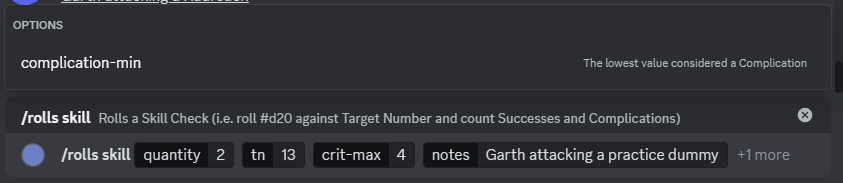
The player hits Enter to send the command. The bot will crunch the numbers and send the following response.
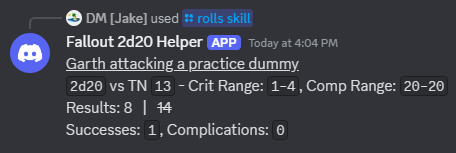
Garth rolled an 8 and a 14. Since only the 8 was at or below the TN of 13, Garth only got one Success. Luckily, this is exactly what he needed to hit the Practice Dummy (who has a Defense of 1).
Rolling for the Hit Location
Next, Garth has to determine where the Practice Dummy got hit. The player enters the base command name of /rolls hit-location. Since the Practice Dummy is classified is a Humanoid target, the defaults can be used. Again, the notes parameter is optional.
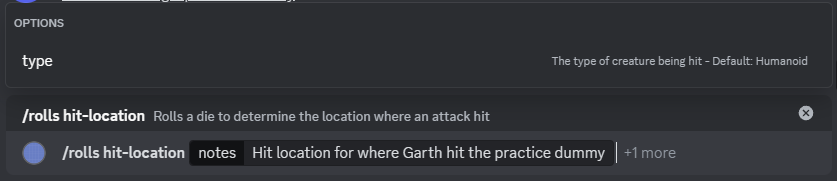
The player hits Enter to send the command. The bot performs the roll and sends the following response.
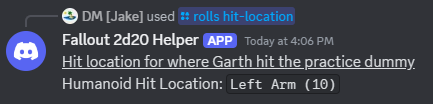
Garth hit the Practice Dummy in the left arm.
Rolling for Damage
Finally, Garth needs to see how much damage he did to the Practice Dummy's left arm. He is running low on ammo, so won't be spending any additional ammo to do more damage. The player enters the base command name of /rolls combat-dice. Then they enter the following values:
| Parameter | Value | Notes |
|---|---|---|
| quantity | 4 |
The number of Combat Dice defined by the weapon |
| notes | ... | This is optional and can be anything |

The player hits Enter to send the command. The bot determines the totals and sends the following response.
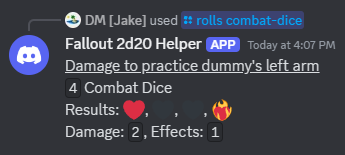
Garth rolled 2 damage and 1 effect. Unfortunately, his weapon doesn't have any damage effects that can be triggered, so he ignores the Effects amount. The Practice Dummy then applies the 2 damage to their left arm but since they have a Physical Damage Reduction of 1, they will only take 1 damage (2 - 1 = 1).