Using Personal Pools
This example shows the flow of creating Personal Pools.
Like AP Pools, Personal Pools can be capped/limited to a max amount that can be stored. An uncapped Pool would be used for something like Caps, Ammo, Materials, etc, whereas a capped Pool would be used for something like Luck Points.
This tutorial covers creating and using an uncapped Ammo Pool.
Registering the Ammo Pool
Naomi just purchased a new gun, a shiny 10mm pistol and wants to add a Personal Pool to track how much 10mm ammo she has. The player enters the base command name of /trackers personal-pools register. Then they enter 10mm ammo for the name and leave the max at the default.
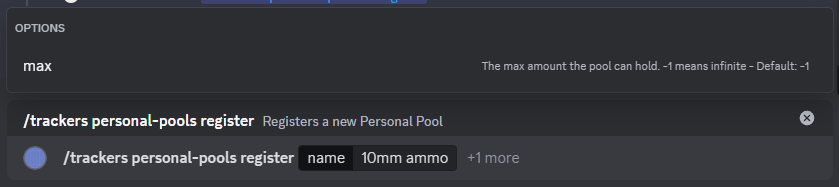
The player hits Enter to send the command. The bot responds stating that the pool has been created.
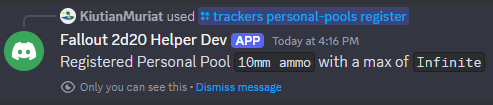
Now Naomi can start using the new Pool.
Adding to the Ammo Pool
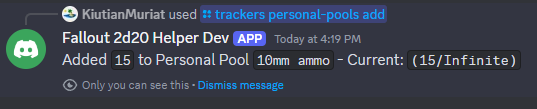
Along with the pistol, Naomi also purchased 15 10mm bullets and needs to add them to the 10mm ammo pool. The player enters the base command name of /trackers personal-pools add. Then they enter the following values:
| Parameter | Value | Notes |
|---|---|---|
| name | 10mm ammo |
The name of the pool created above |
| amount | 15 |

The player hits Enter to send the command. The bot responds stating that the amount has been added to the pool.
Finding Personal Pool Names
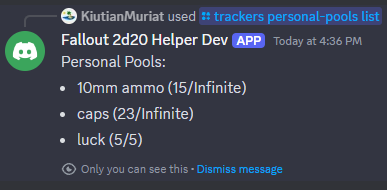
If player could not remember the name of the Personal Pool they had created, they could use the List Personal Pools command. The player enters the base command name of /trackers personal-pools list.

The player hits Enter to send the command. The bot responds with the list of Personal Pools.
Subtracting from the Ammo Pool
Later in the session, Naomi gets the opportunity to use her new pistol. After she performs an attack, she needs to remove the ammo that she used. In addition to the normal 1 ammo for the attack, she also used 2 additional ammo to increase her damage. The player enters the base command name of /trackers personal-pools subtract. Then they enter the following values:
| Parameter | Value | Notes |
|---|---|---|
| name | 10mm ammo |
The name of the pool created above |
| amount | 3 |
1 from the base attack + 2 additional ammo spent dealing more damage |

The player hits Enter to send the command. The bot responds stating that the amount has been subtracted to the pool.
